Artillery Assistant
How did your shot go?
Before the shot, hints in the artillery sight help you judge whether the terrain is in the way. After the shot, the camera follows your shell. You see where it landed and can pick the point for the next shot.
Berlin
Camera in flight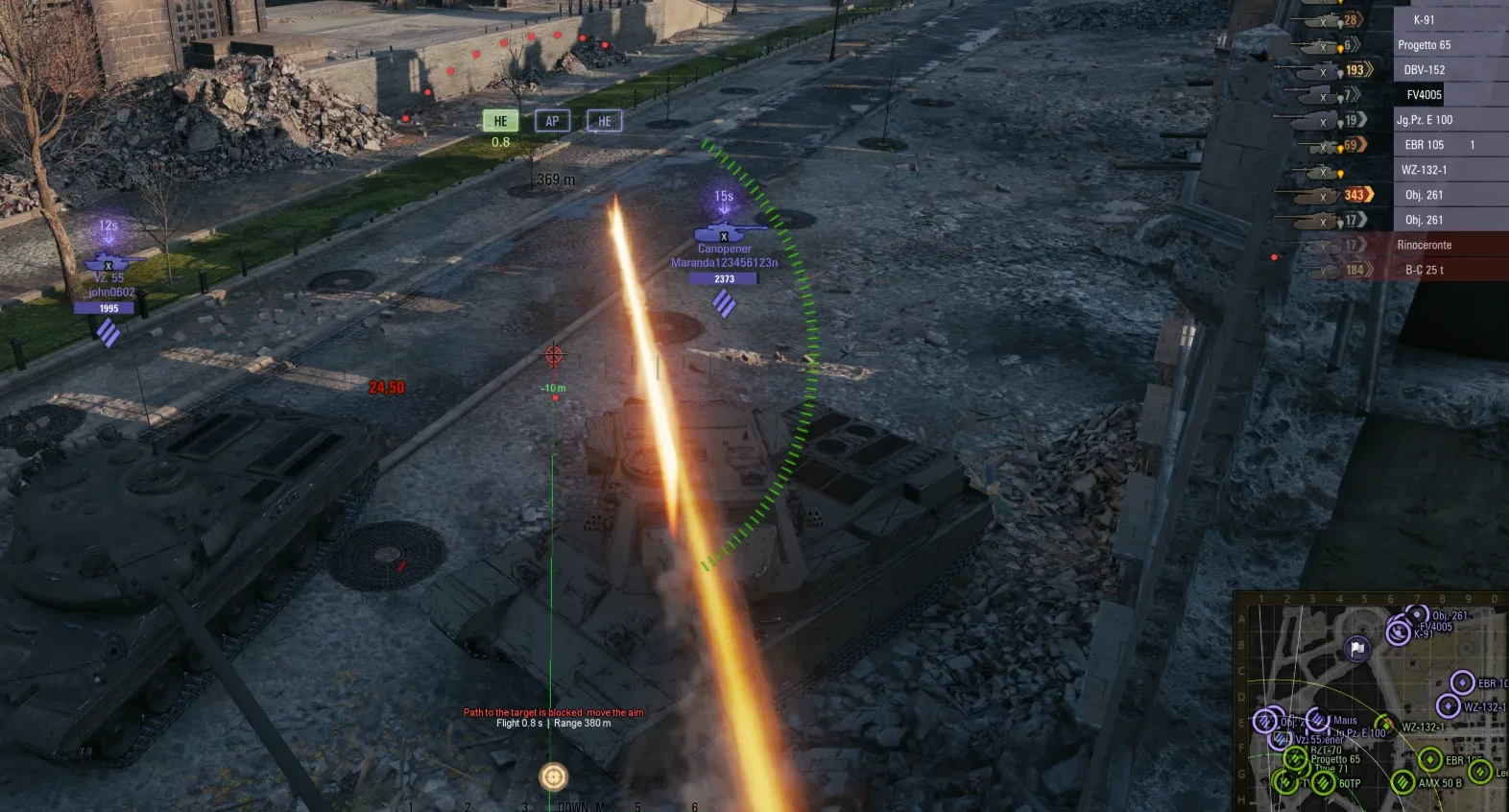
What the mod does
An artillery camera that flies after your shell, and a smart sight that shows in advance whether the shot will get through. The mod works on SPGs.
- The camera follows the shell
- After the shot, the camera flies after your shell from launch to impact, then returns smoothly to the sight. The mod accepts only your shell and ignores other players’ shells and old ones. See how it looks
- Smart Ballistics
- In the SPG sight, it shows whether the way to the target is clear for the shell and, if not, where it will hit the obstacle. You see the shot status, the sectors of the dispersion circle, the landing point and the distance to the target. It does not change game ballistics. Sight icons
- G mode
- A separate camera view for aiming an SPG. Turn it on with G or the right mouse button; H returns the standard view. Camera transitions are limited in time and speed, with no jerks. SPG camera
- Mouse wheel zoom
- Smooth zoom of the G camera with the mouse wheel, both in and out. Zoom speed and the distance limits are adjustable.
- Camera protection from obstacles
- The camera keeps its distance from walls, rocks, terrain and objects. If it gets too close, the mod pulls the camera back and returns it when there is room.
- And more
- A settings window in the shared WEB271 menu, in RU and EN. The mod’s messages in the game chat can be turned off. By default the mod does not work on assault SPGs.
Why Artillery Assistant
- You see your shot to the end
- The camera follows the shell from launch to impact and returns by itself.
- Only your shell
- The mod does not show other players’ shells and does not reveal enemy positions.
- Hints, not an aimbot
- Smart Ballistics shows whether the shot will get through. It does not change game ballistics.
- Smooth, with no jerks
- Camera transitions are limited in time and speed.
- The camera keeps its distance from walls and ground
- The mod moves the camera away from obstacles and returns it when there is room.
- Everything is set up in the game
- A settings window in the shared WEB271 menu, in Russian and English. One icon and one menu for all WEB271 mods.
One shot on Westfield
Before firing, press Alt. For five seconds the mod waits for a shot from your gun. If the shell is already in the air, press Alt while the flight lasts. When it ends, the camera returns to the sight.
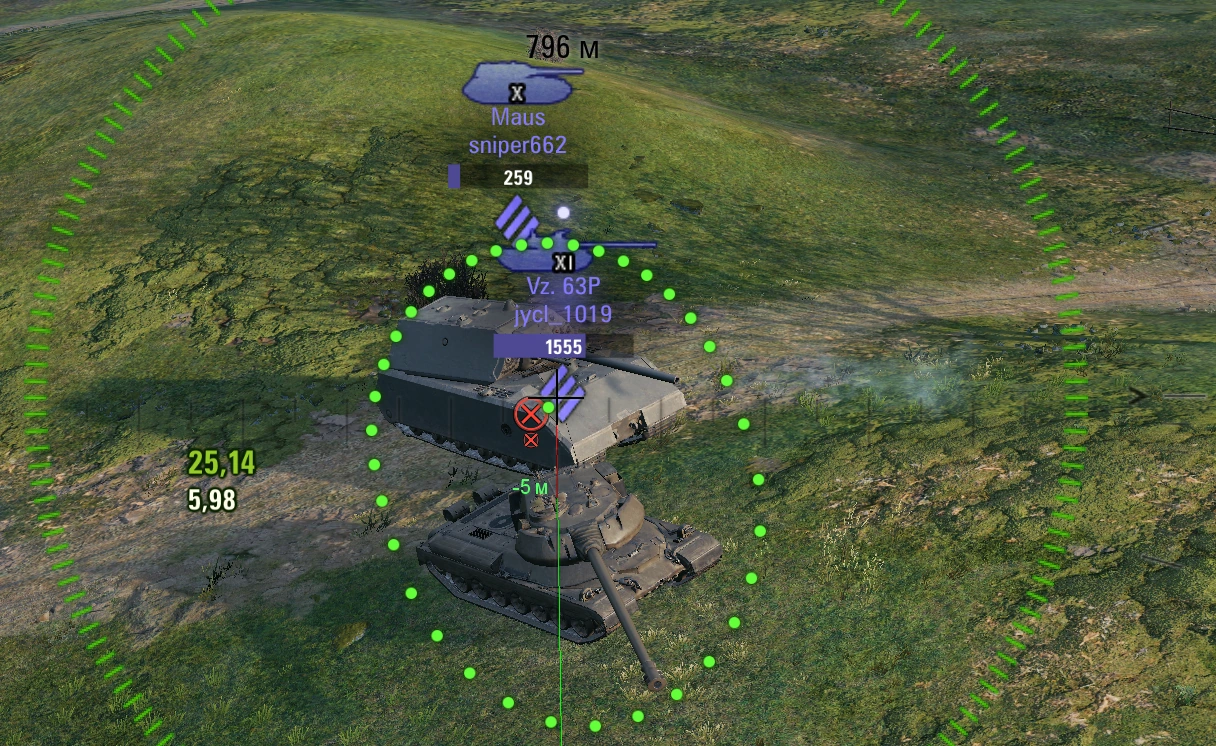
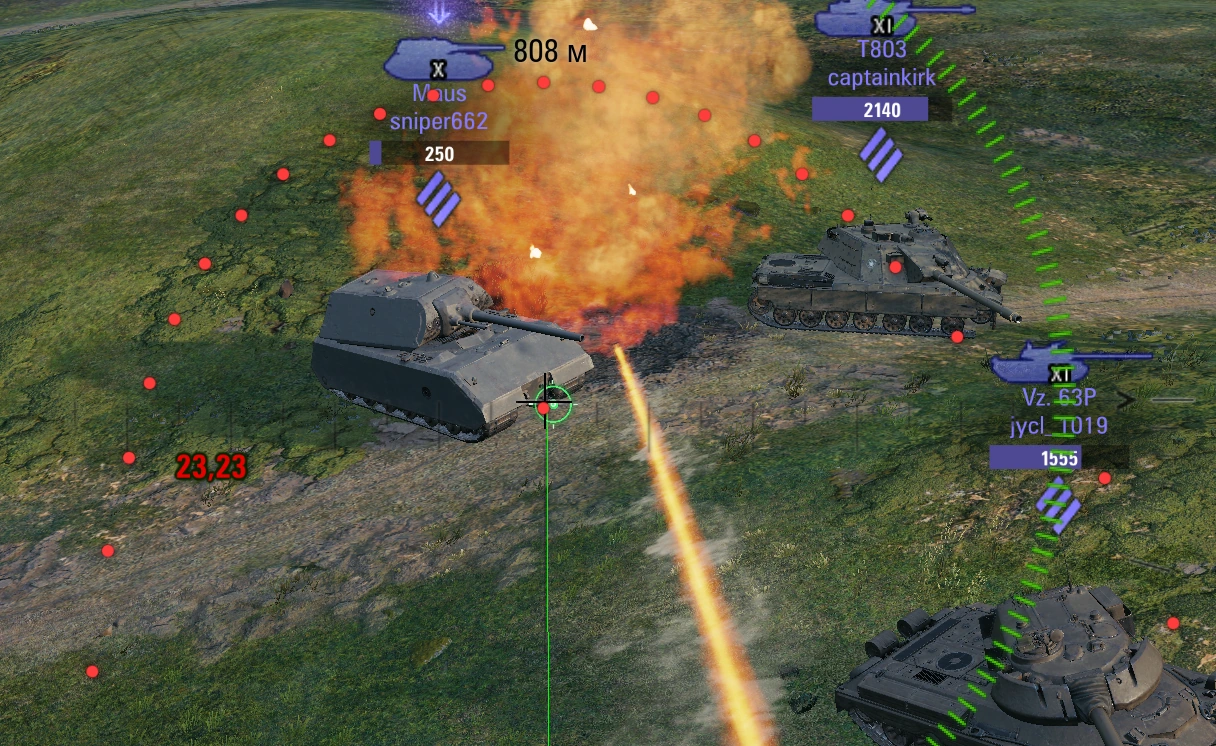
To watch every shot of yours, turn on “Auto-follow” in the settings. With manual following, pick the shot you want with Alt.
What the sight shows before the shot
Smart Ballistics checks the path to the chosen point and the directions inside the dispersion circle. The icon in the centre tells you whether an obstacle is in the way, even when the vehicle behind it is visible. The icons below are from the mod itself.
 Path is clear
- No obstacles were found in the checked directions. Gun dispersion still affects where the shell lands.
 Part of the circle is blocked
- Some directions run into an obstacle. Look at the marked sectors of the circle and try moving the aim point.
 Path to the target is blocked
- There is an obstacle on the way to the chosen point. You can check another point or change the SPG’s position.
The sight can also show the estimated landing point and the distance. These hints help you judge the shot; the shell’s flight is calculated by the game itself.
Aiming and view from the SPG camera
The alternative view helps when there is a fold in the terrain or the edge of a building in front of the target. Zoom in on the area, check the sight position and return to the overall view.
- G Alternative view
- Switches the artillery camera. By default the same switch is on the right mouse button.
- Mouse wheel
- Zooms the camera in and out in G mode. Zoom speed and limits are adjustable.
- H Standard view
- Returns the regular SPG camera when you finish looking at the area in G mode.
When the G camera comes close to a rock or a wall, the mod moves the viewpoint away from the surface. When there is room again, the camera returns to the chosen distance.
Default keys
- G or the right mouse button
- Turn on G mode.
- H
- Return the standard view.
- Alt
- Shell follow. Press before the shot or while the shell is in the air.
- Mouse wheel
- G camera zoom.
What to set up for yourself
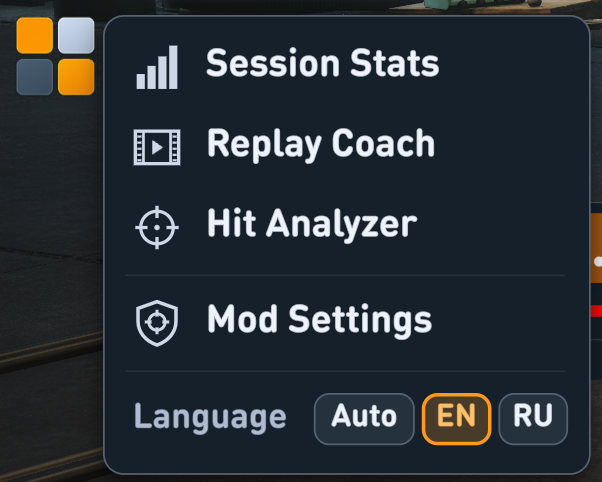
In the Garage, click the WEB271 icon and choose “Mod Settings”. In the window that opens, click Artillery Assistant in the list on the left.
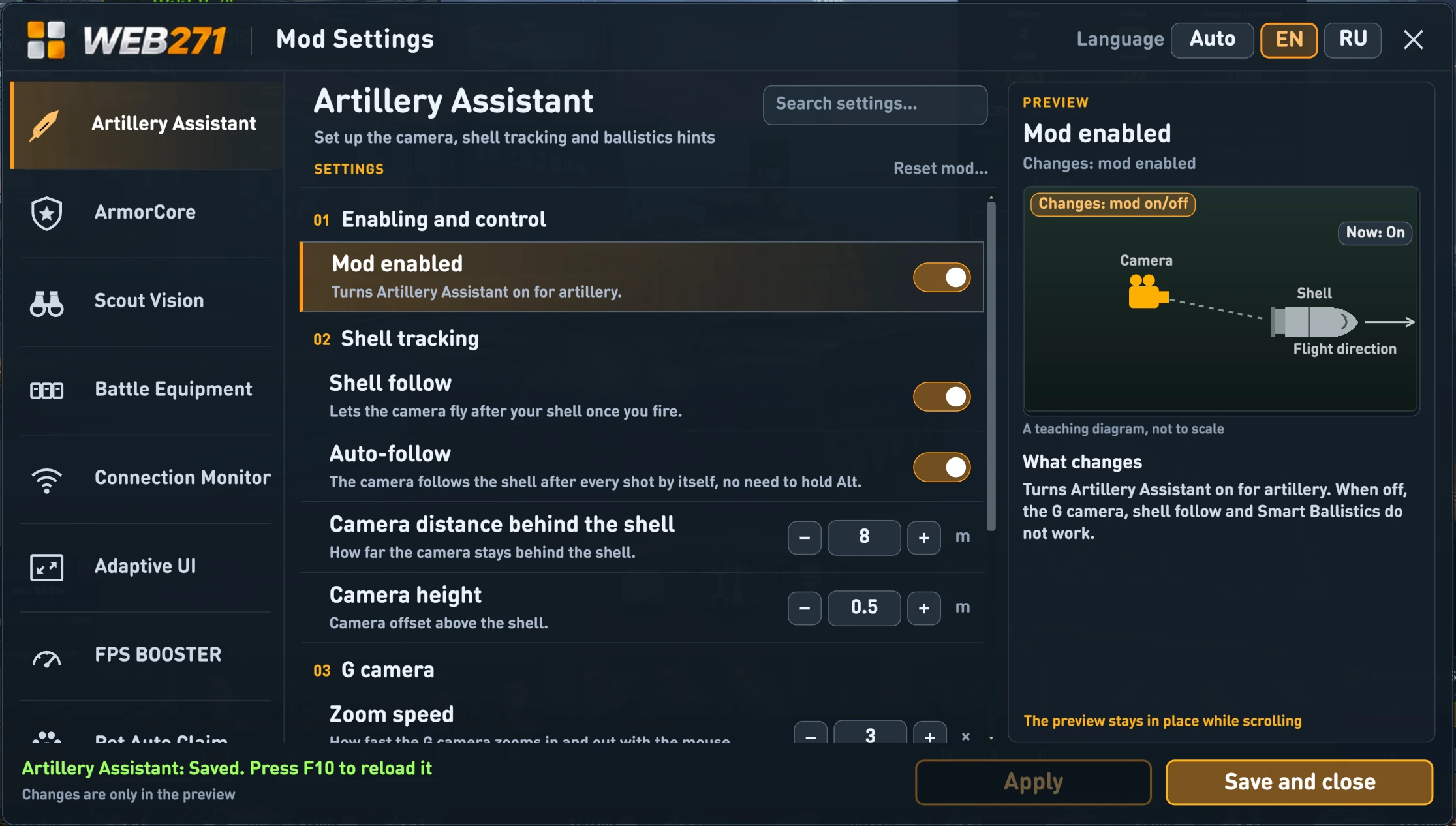
The settings are grouped into four sections: “General”, “G camera”, “Shell follow” and “Smart Ballistics”.
- Mod enabled
- Turns Artillery Assistant on for artillery. When off, the G camera, shell follow and Smart Ballistics do not work.
- Do not work on assault SPGs
- When on, the mod does not work on assault SPGs. Regular SPGs are not affected by this limit.
- Mod messages in chat
- Shows the mod’s messages in the game chat.
- Shell follow
- Lets the camera fly after your shell once you fire. When off, following and its settings do not work.
- Auto-follow
- The camera follows the shell after every shot by itself, no need to hold Alt.
- Camera distance behind the shell
- How far the camera stays behind the shell. Closer: the shell looks bigger. Farther: you see more of the map. The default is 28 m.
- Camera height
- Camera offset above the shell. This is a vertical offset, not the distance behind the shell. The default is 4.5 m.
- Zoom speed
- How fast the G camera zooms in and out with the mouse wheel. Normal speed is 2.2; higher is faster.
- Camera collision protection
- Protects the G camera from walls and ground. This is camera behaviour, not a change to shell collisions.
- Smart Ballistics
- In the artillery sight, shows whether the way to the target is clear for the shell and, if not, where it will hit the obstacle. Does not change game ballistics.
- Sight icons and hints
- The sight indicator, hints, distance and dispersion corridor are turned on separately. Icon sizes are set in pixels.
- Shell trail and flight data
- Two switches in the “Shell follow” section.
Questions and answers
- Is this a cheat?
- The mod does not change ballistics and does not show other players’ shells or enemy positions. It controls only your camera and the hints in your sight.
- Which clients does it work on?
- World of Tanks ASIA 2.4.1.1. The mod has not been tested for other regions.
- Does it work with other mods?
- Tested with the other WEB271 mods. Not tested with third-party mods.
- How do I turn it off?
- In the settings window turn off “Mod enabled”, or delete the
.wotmodfile. - Does it work on assault SPGs?
- Not by default. The “Do not work on assault SPGs” setting changes that.
Download, installation and versions
Download
The Artillery Assistant download link will appear here.
Installation
1. Close the game and download the .wotmod file. 2. Copy it to the World of Tanks\mods\2.4.1.1 folder. 3. Start the game: the WEB271 menu icon appears on the left in the Garage, with Artillery Assistant in it. The first launch of a new version may need one client restart.
Free version
The whole mod is free.
Paid version
There is no paid version; this mod needs no subscription.
Artillery Assistant is an unofficial community mod. It is not affiliated with or endorsed by Wargaming.net. World of Tanks is a trademark of Wargaming.net. Use at your own risk and follow the fair play rules.