ArmorCore
World of Tanks mod

ArmorCore

Know whether you will penetrate before you fire

The penetration chance at the chosen point, a plain status and the best shell beside your crosshair. For World of Tanks Asia 2.4.1.1.

The card by the crosshair
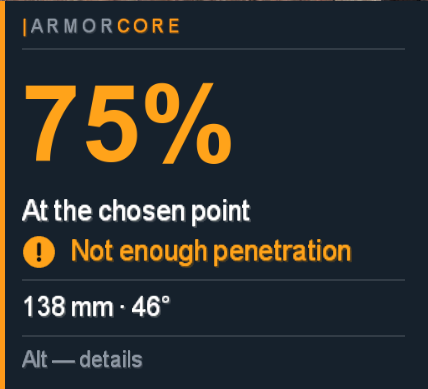
The ArmorCore card: an orange “75%”, “At the chosen point”, “Not enough penetration”, “138 mm · 46°” and the Alt hint.

A number, a status in words, armor and angle, and the Alt hint for details at the bottom.
Replay

Berlin
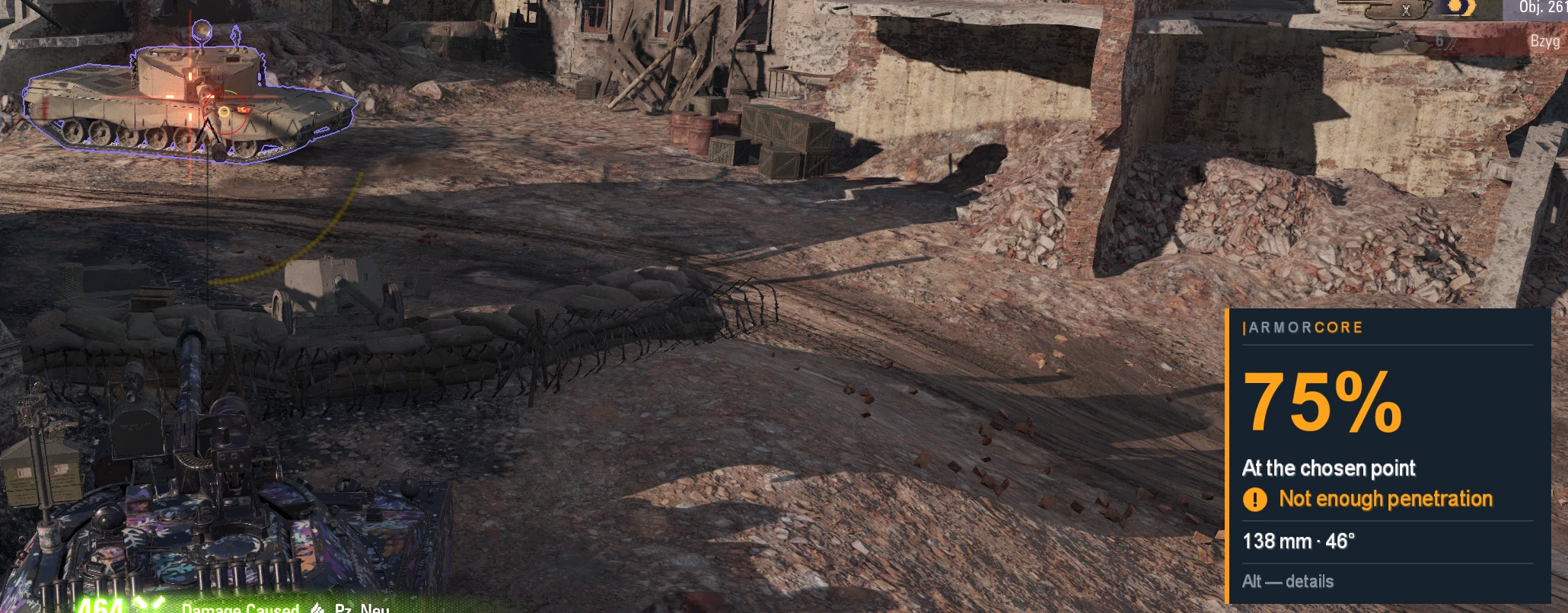
A replay. The crosshair is on a Pz. Neu; on the right is the ArmorCore card with “75%” and “138 mm · 46°”.
At the chosen pointNot enough penetration138 mm · 46°

The crosshair tells you at once whether the chosen point will be penetrated

The mod shows, beside the crosshair, the chance to penetrate exactly the point you aim at and suggests a better shell. The mod draws everything itself, with no third-party mods or dependencies.

Chance at the chosen point

The number covers the whole aiming circle, not one point. The colour tells you at a glance whether to fire.

A status in plain words

High penetration chance, not enough penetration, or a steep angle. No tables and no maths. On a ricochet the card says so.

The best shell

If another shell in your ammo rack is clearly better, the card shows it, for example “HEAT: 65% +35 pp”. You switch the shell yourself.

Details on Alt

A table of your shells for the same point, the selected shell and a disclaimer. Works in replays too.

No third-party mods

No GUIFlash and no other dependencies: the mod draws with the client's own means.

One card

One clear card instead of six scattered numbers, a status in words and a details panel on Alt.

What the card shows

Default colours: green from 80%, orange from 30%, red below. On a ricochet a purple ricochet label replaces the number.

A replay: the crosshair is on the target, the ArmorCore card with an orange “75%” is on the right.
The card in a replay. The crosshair is on the target; the card sits below and to the left and does not cover the numbers near the crosshair.
The ArmorCore card up close: “75%”, “At the chosen point”, “Not enough penetration”, “138 mm · 46°” and the Alt hint.
Not enough penetration. An orange “75%”; the meta line shows armor and angle: “138 mm · 46°”.
The large number
The penetration chance, rounded to 5%.
A status in words
High penetration chance, not enough penetration, or a steep angle, with an icon.
Armor and angle
For example “253 mm · 67°” in the meta line of the card.

How it works

1. Aim
The aiming circle is taken into account: the number is calculated over 9 points of the circle (the centre and 8 around it), with the shell's penetration spread.
2. Read the card
A large percentage, a meaningful colour and a status in words.
3. Open the details
Holding Alt shows a panel instead of the card: the number, the status, the angle, the table of your shells for the same point, the selected shell, the note that the shell is never switched automatically, and a disclaimer.

Diagram: how the number is calculated

ArmorCore calculation diagram: the aiming circle on the armor and nine check points — one in the centre and eight around it. Five points on thin armor are green, four on thick armor are red. thin armor thick armor 1 2 3 4 5 6 7 8 9 dashed line — the aiming circle
A diagram, not a game frame. Example: the crosshair is on the joint of thin and thick armor.
The aiming circle
The dashed circle is the area the crosshair covers. The mod takes all of it, not just the point in the centre.
9 points
Point 1 is in the centre, points 2–9 are around the circle. At each one the mod checks armor and angle.
Penetration spread
At each point the armor is compared with the shell's penetration, including its spread. In the diagram green points mean penetration is likely, red points mean there is more armor.
One number
All nine points give one number on the card. That makes it more honest than “did the centre hit or not”.

If another shell in your ammo rack is better by 15 pp or more, the card shows it in a separate line. Only shells you actually carry are suggested, and the choice stays with you.

The card is moved with Ctrl + left mouse button, only when you press right over the card.
Settings in the WEB271 menu

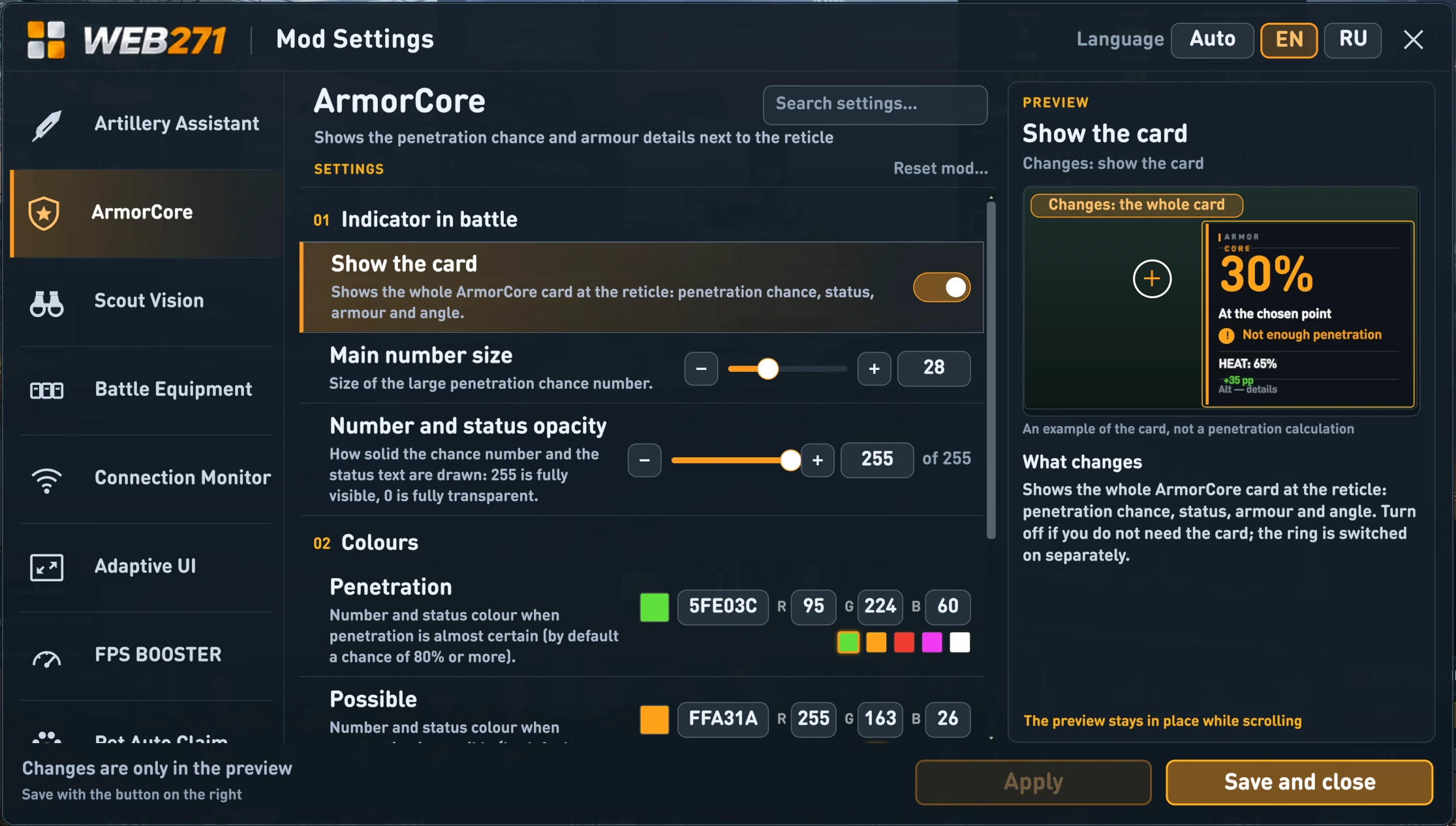
The Mod Settings window in the Garage, ArmorCore page: the in-battle indicator section with the card switch, the size of the main number and the opacity of the number and status. A card preview is on the right.
The ArmorCore page in the Mod Settings window. The card switch is selected. On the right is a preview with a sample card and a note on what will change.
Show the card
Shows the whole ArmorCore card by the crosshair: penetration chance, status, armor and angle.
Size of the main number
The size of the large penetration chance number.
Opacity of the number and status
How solid the chance number and the status text are drawn: 255 is fully visible, 0 is fully transparent.
Colours
Separate colours for penetration, possible penetration and no penetration.

What the mod does not do

Questions and answers

What does ArmorCore show?

A card beside the crosshair: the penetration chance at the chosen point, a status in words, “armor · angle” and a hint about another shell. Alt opens the details. Default colours: green from 80%, orange from 30%, red below.

Does it need other mods?

No. ArmorCore draws everything itself and needs neither GUIFlash nor any other dependency.

Is the calculation exact?

It is an estimate based on client data, with the penetration spread and the aiming circle. The mod does not guarantee a hit or damage.

Does the mod switch shells?

No. The mod only suggests; the choice stays with you. The panel says the shell is never switched automatically.

Does it work in replays?

Yes, including on pause: the card stays and Alt opens the panel.

What about HE shells?

For HE the chance is calculated with the client formula. There is no number for HESH and no damage percentage for modern HE.

Does it drag other mods along?

The card is moved with Ctrl + left mouse button only when you press right over it.

Download, installation and versions

How to download

The ArmorCore download link will appear here. Version 0.1.0, game World of Tanks Asia 2.4.1.1, no dependencies, languages RU and EN.

How to install

Put the mod file into the mods/<game version> folder.

Free version

The mod is free in full.