World of Tanks mod Adaptive UI Game interface scale for your screen
The mod picks the World of Tanks interface scale for your monitor, applies changes in a second without restarting the game and keeps the menu button in place at any scale.
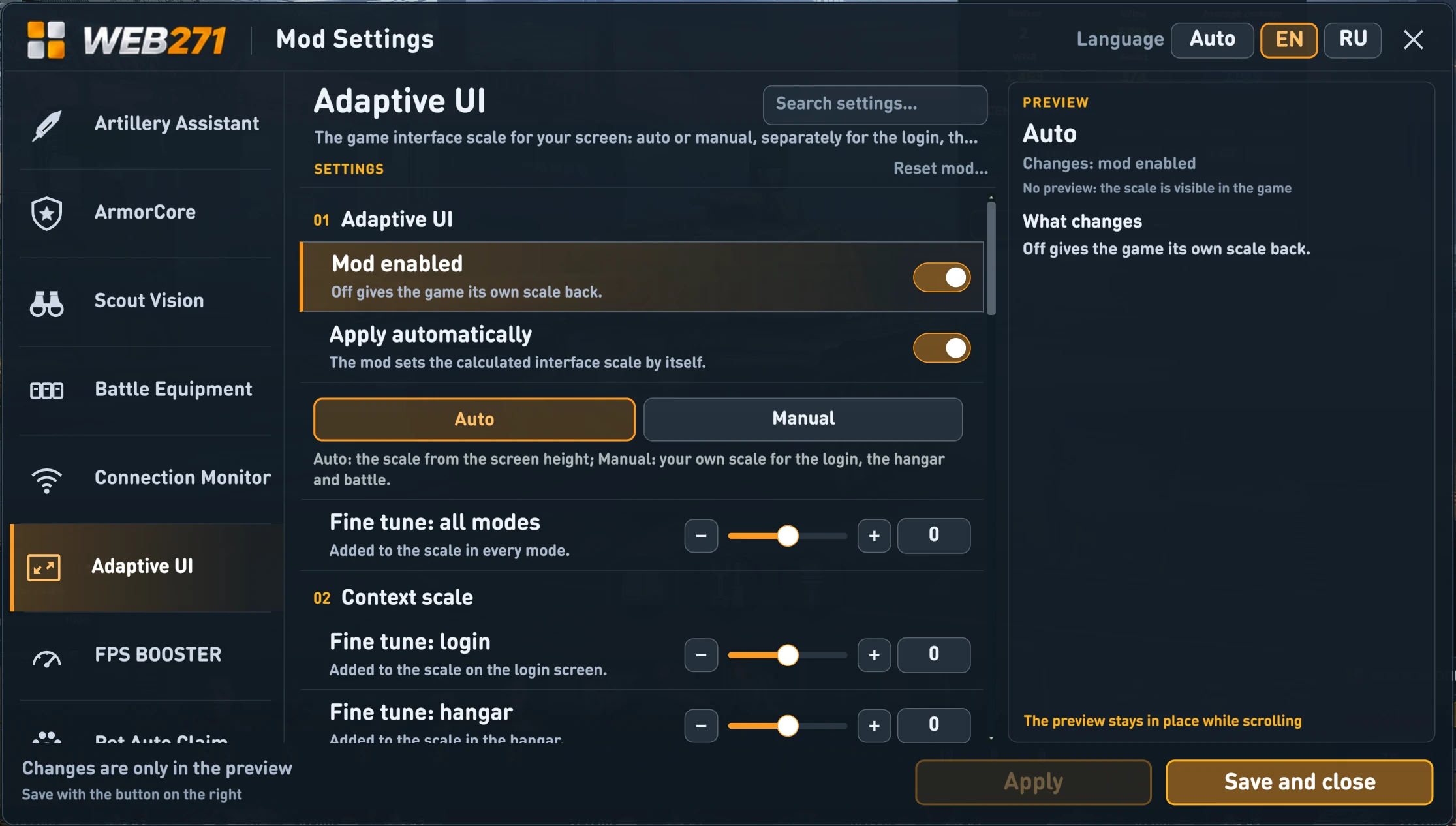
Mod Settings Adaptive UI
What the mod does
Any intermediate scale The mod sets any intermediate scale, picks it for the screen and adjusts the Garage camera.
Auto or manual Auto: the scale follows the screen height. Manual: your own scale for login, Garage and battle.
No restart Changes apply in a second without restarting the game.
Settings: five sections
The list is taken from the mod's settings screen in the game. The right side of the window shows what the selected row changes.
01 Adaptive interface Mod enabled — turning it off gives the game its own scale back Apply automatically — the mod sets the calculated interface scale itself Auto or Manual — auto: scale by screen height; manual: your own scale for login, Garage and battle Adjustment: all modes — an addition to the scale in all modes 02 Scale by mode Adjustment: login Adjustment: Garage Adjustment: battle Correction: login, % Correction: Garage, % Correction: battle, % In Manual mode three more rows appear: manual scale for login, Garage and battle 03 Garage camera Garage camera follows the scale Strength: Garage camera Vehicle Hub camera follows the scale Strength: Vehicle Hub Strength: armor inspection Minimum camera distance Maximum distance: Garage Maximum distance: Vehicle Hub Maximum distance: armor inspection Extend the zoom limit Refresh the camera when settings change 04 Advanced Target height: login, Garage, battle (px) Minimum and maximum scale Auto-scale step Adjustment step Hold the scale Recalculate after an interface reset Apply on start Wait for the Garage or battle Intercept the game scale Check after applying, s Recalculation delay, s Watch period, s Scale tolerance Hold delay, s 05 Diagnostics Battle profile to the log
Good to know
The effect is noticeable at 1440p and above; at 1080p the mod changes nothing by default.
Turning the mod off gives the game its own scale back.
The settings window has no scale preview: the scale is seen in the game.
Download, installation and versions
How to download The Adaptive UI download link will appear here.
How to install Step-by-step installation instructions will appear here.
Free version The mod is free in full.
Paid version There is no paid version; this mod needs no subscription.